
Wonderchat alternative for SaaS supportCompare pricing, human handoff and account data
For a small SaaS team that needs AI answers, a handoff to people and answers about the signed-in customer’s account, OneTwoAgent plans run $19–$249 a month with unlimited teammates. Wonderchat Basic is $149 a month with 3 team seats — and it stays the better fit when you want the AI to change data through API tools.
14-day free trial · 50 AI conversations · no card
OneTwoAgent Unlimited teammates on every plan
Wonderchat
Enterprise from $1,499
The mark shows Wonderchat billed yearly: $124 (Basic) and $417 (Scale) a month. Usage units differ: see below.
One conversation, counted two ways
An example support chat inside a SaaS app. What each product counts, and what each needs from you, at the two moments that matter.
1The AI answers from the account
- Wonderchat
- Message credits for the AI reply — how many depends on the model and the context. Account facts arrive as claims in a JWT your backend signs, or through a Tool that calls your API.
- OneTwoAgent
- Starts 1 AI conversation (room for 10 AI replies). The answer reads a signed snapshot or a read-only lookup your backend answers for this customer.
2A person takes over
- Wonderchat
- Live Chat opens after the number of messages you set, within your opening hours — or the chat goes to your team by email. A team seat answers.
- OneTwoAgent
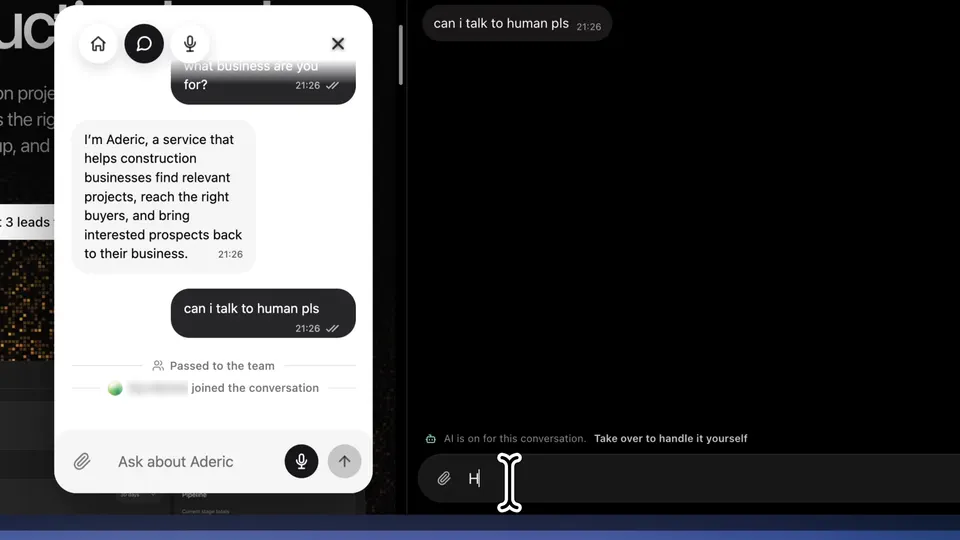
- The AI stops instead of guessing and marks the chat Needs reply. Any teammate takes over; the customer sees who joined. Teammates aren’t counted.
What the monthly price includes
Wonderchat Basic against OneTwoAgent’s four plans. The units don’t convert into each other, so the last row tells you how to price your own month.
| Compared | Wonderchat Basic | OneTwoAgent |
|---|---|---|
| Monthly price | $149 a month. Scale $499; Enterprise from $1,499. | $19 / $49 / $99 / $249 a month (Starter, Core, Growth, Scale). |
| Billed yearly | $124 a month (“Save 17%”); Scale $417. | Monthly plans. |
| People | 3 team seats. | Unlimited teammates on every plan. |
| AI usage | 5,000 message credits a month. Each AI reply uses message credits; how many depends on the AI model and context length. Credits reset monthly and don’t roll over; 1,000 more cost $29.99, one-time. Wonderchat’s pricing page and credits guide differ on what happens when credits run out. | 100 / 500 / 1,500 / 5,000 AI conversations a month; each covers up to 10 AI replies. |
| AI agents | 2 AI agents, 1,000 web pages each, 2 chat workflows. | Your agent learns your website, files and docs. |
| Try it | 7-day free trial; a Free plan with 20 credits. | 14-day free trial with 50 AI conversations, no card. |
Where they’re alike, and where they differ
Both answer from your knowledge and both hand chats to people. The differences are in who can answer, how account data gets in, and whether the AI may change it.
| Compared | Wonderchat | OneTwoAgent |
|---|---|---|
| Answers from your knowledgeBoth | Website crawling (1,000 pages per agent on Basic), documents, and Zendesk or Freshdesk tickets and articles. | Your website (refreshed automatically), PDF, DOC, DOCX, XLSX, CSV, TXT files, Google Docs, Sheets, Slides, and a Help Center import including Intercom. |
| Human handoffBoth | Human handover on Basic and above: Live Chat after a set number of messages, within opening hours, or handover by email. | The AI stops when evidence or authority is missing, or when the customer asks for a person. No scripted “a human will reply” message; the chat is marked Needs reply. |
| Who answersDiffers | Admins and Members answer live chats; Basic includes 3 team seats. | Any teammate takes, assigns or replies, live for the whole team, and Resume AI hands the chat back. No seat limit. |
| Signed-in customersDiffers | Your backend signs a JWT with claims such as plan and role; claims can go into the AI’s context. The chatbot must be set to Private. | Your server exchanges its own session for an identity token (15 minutes). One widget serves anonymous visitors and signed-in customers. |
| Live account dataDiffers | Custom Tools call your APIs with an API key or bearer token; an MCP connector on Scale and above. | A signed snapshot at most 5 minutes old, plus read-only lookups your backend answers (subscription, access, usage, jobs, integrations, and up to 8 views), with the session rechecked each time. |
| Changing dataDiffers | Tools can use POST, PUT and DELETE, and an MCP server’s tools can update records. | Read-only account access: a request that needs a change goes to your team. |
| SetupDiffers | In the Wonderchat dashboard: embed the widget, sign JWTs on your backend, describe each API Tool. | Onboarding learns your site and styles the widget. For account answers, one CLI command and your coding agent wire sign-in and a read-only endpoint; doctor verifies production. |
| Channels and VoiceDiffers | Integrations include WhatsApp and Microsoft Teams; Voice Agent on Scale. | Website widget, WhatsApp, Instagram and Telegram in one inbox; Voice in the widget on paid plans. |
Which one fits your support
Choose OneTwoAgent when
- Your customers sign in, and the hard questions are about their own plan, usage or jobs.
- More than 3 people help with support, or that number changes.
- You want AI usage counted per conversation, not per reply.
- You want account access read-only, with an owner approving what the agent may see.
- Your engineers already work with a coding agent.
Wonderchat stays the better fit when
- The AI should change data — bookings, records, orders — through API Tools or MCP.
- You build multi-step chat workflows in plain English.
- You want to choose the AI model, and the credits that come with it.
- You train the agent on Zendesk or Freshdesk tickets.
- The chatbot is private: only verified users may use it.
Test it beside Wonderchat before you switch
Nothing has to change on your live site until the answers prove themselves.
Keep Wonderchat running
Start the trial: 14 days, 50 AI conversations, no card.
Add your knowledge again
Point it at your website, docs and files. There is no Wonderchat import; nothing is copied across.
Install where only your team sees it
A staging site or an internal page is enough for the first round.
Connect sign-in for account answers
Run the CLI command and give your coding agent the prompt; doctor verifies production. Skip this if docs answers are all you need.
Replay twenty real questions
Take them from your Wonderchat chat logs, including two account questions and one “can I talk to a person?”. Admins and Members can download chat logs; Basic and above can export them through the API.
Price both, then swap the script
Use your own volume in each unit. Chat history stays in Wonderchat, so export it before you cancel.
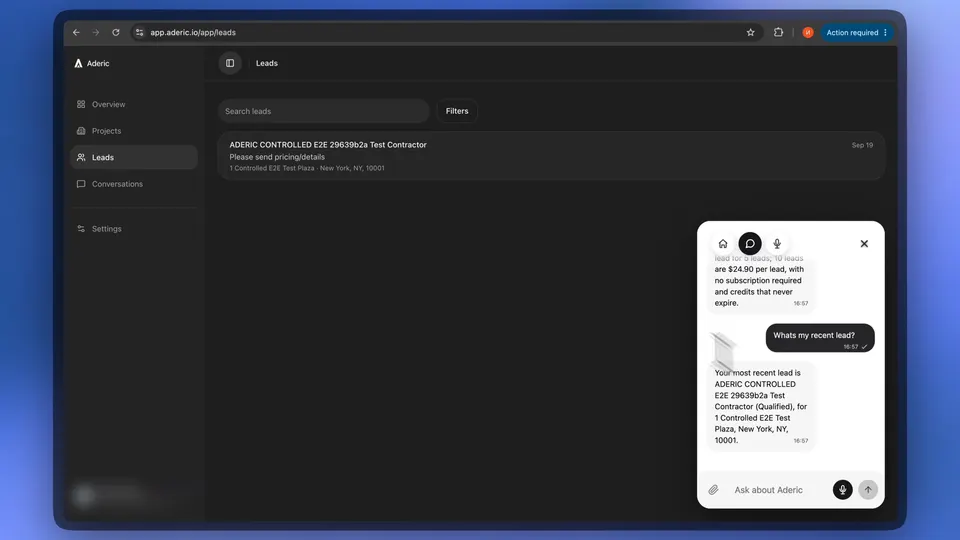
See it inside a real SaaS
Our own walkthrough: we connected OneTwoAgent to aderic.io and recorded it end to end. It shows the product working; it isn’t a customer case study.
Questions before you switch
Is OneTwoAgent cheaper than Wonderchat?
The list prices are lower: OneTwoAgent plans are $19 / $49 / $99 / $249 a month with unlimited teammates; Wonderchat Basic is $149 a month ($124 billed yearly) with 3 team seats. The usage units differ — message credits spent on each AI reply against AI conversations of up to 10 replies — so price your own month in both.
Does Wonderchat have human handover?
Yes, on Basic and above: Live Chat after a set number of messages, within your opening hours, or handover by email. OneTwoAgent hands off silently instead of sending a scripted message, marks the chat Needs reply, and any teammate can take over.
Can Wonderchat answer from a customer’s account?
With setup, yes: identity verification passes signed claims such as plan or role (the chatbot must be Private), and custom Tools or the MCP connector (Scale and above) call your systems. OneTwoAgent uses a signed snapshot and read-only lookups your backend answers, for anonymous and signed-in visitors in one widget.
Are Wonderchat message credits the same as AI conversations?
No. Each Wonderchat AI reply uses message credits, and how many depends on the model and the context. A OneTwoAgent AI conversation covers up to 10 AI replies. 5,000 credits and 5,000 conversations are not the same amount of support.
Can I move my Wonderchat history to OneTwoAgent?
No. OneTwoAgent has no Wonderchat import. Add your website and docs as knowledge, export your Wonderchat chat logs for your records, and keep both running until you switch the script tag.
Do I need a developer?
Not for answers from your docs: onboarding learns your website and the widget is one script tag. Account answers need your app to identify the customer and answer read-only lookups; your coding agent builds that from one prompt, and doctor verifies production.
Run it beside Wonderchat on your own app.
Real questions, a signed-in test customer, a handoff to your team — before you change anything. 14-day free trial with 50 AI conversations, no card required.
Sources
Wonderchat: official pricing page (Support Agent, monthly and yearly) and documentation, checked Oct 12, 2026. Prices in USD; plans change. OneTwoAgent: our pricing and docs.